A customer reports a bug — and development gets a tested fix to review.
From issue to tested fix.
FixControl connects your support desk, documentation and codebase. Start from a customer report or an engineering issue: FixControl investigates the cause, proposes a code change and tests it in an isolated sandbox — then hands it to your developers for review.
By default, nothing goes to your customers, repositories or production without a recorded approval from your team. Code changes arrive as a pull request, never straight to your main branch.
FixControl works on top of Freshdesk, Jira, GitHub, GitLab, Slack, Teams and e-mail — and replaces none of them.
Two starting points. One path to a tested fix.
Support can start it. Engineering can start it. What happens after that runs through the same steps: FixControl investigates and tests, your team decides.
Start from support
A customer reports a problem. FixControl combines the ticket with your documentation and code, investigates the likely cause and proposes a fix.
- Customer report
- Investigation
- Proposed fix
For customer-reported bugs and escalations from support to development.
Start from engineering
Your team already knows about the bug. File it in FixControl or open a work session on the codebase, and it goes straight to the code: analysis, a patch, tests.
- Known bug
- Code analysis
- Tested change
No support ticket needed — for defects, backlog items and internal issues.
Different starting points. The same eight steps to a tested change:
Investigate
Read-only, inside the project- An issue comes in
From a customer through your support desk, e-mail, Slack or Teams — or filed directly by your team.
- FixControl collects tickets, docs and code
The report, earlier tickets, the documentation you connected and the project's repository.
- It investigates the code
It follows the report into the relevant code path and recent changes.
- It names the likely cause
Which part of the code is probably responsible, and why.
Propose and test
Tested in isolation — nothing pushed to your repository yet- It proposes a code change
A concrete patch. Nothing has been changed or sent yet.
- It tests the change in a sandbox
Build and tests run in an isolated environment. Where FixControl knows how to start your application, it also has to come up.
Your team decides
By default nothing moves on without a recorded approval- A developer reviews
They see the change and the test results, then approve, reject or ask for a revision.
- Pull request after approval
The change arrives as a pull request, never straight to your main branch. A deployment is promoted only where you configured that, after its own approval.
First the right information. Then a proposal. Only after checks, an action.
Follow one report through every stepWhere FixControl fits
More than support AI
Support tools answer questions. FixControl can follow a customer's report into the code and come back with a tested change.
More than a coding assistant
A coding assistant starts from a developer's prompt. FixControl starts from the issue itself — a customer report or a known bug — with the project's earlier tickets, documentation and code, and tests the change before anyone reviews it.
Not AI that acts on its own
By default, every change is tested, reviewed by your team and recorded before it moves on — and it arrives as a pull request, never straight to your main branch.
A customer of your organization reports that the invoice export keeps failing. What happens then?
- 1ReportThe report comes in
The customer mails your service desk: “The invoice export crashes on large files.” The ticket is in Freshdesk and simply stays there.
- 2ProjectFixControl recognizes the project
The mailbox is linked to the Invoicing project. FixControl sees which project and which customer the report belongs to.
- 3InvestigationFixControl investigates with project information
It reads earlier reports about the export, the documentation on invoices, the code of the export function and last week's change — and points to the likely cause.
- 4ProposalAI prepares two things
A draft reply to the customer and a code change that addresses the likely cause. Nothing has been sent or changed yet.
- 5TestThe change is tested first
The code change runs in an isolated test environment — and where that environment knows how to start the application, the application has to come up and answer before the run counts as green. The draft reply is checked for sensitive information.
- 6DecisionSomeone on your team decides
The reviewer — a member of your own team — sees the proposal and the test results and approves, rejects or requests a revision. By default nothing leaves for your customer or production without this recorded decision.
- 7ExecutionOnly now does something happen
The answer goes to the customer. The code change leaves as a pull request — not straight to your main branch. And everything is traceable: who decided, why, based on what.
Freshdesk stayed Freshdesk, and the change arrived in GitHub as an ordinary pull request. All that was added is checks and oversight.
A developer notices that the retry logic sends some webhooks twice.
- The developer files the bug in FixControl. No support ticket is involved.
- FixControl finds the retry code path and the recent changes to it.
- It proposes a patch for the likely cause.
- The project's build and tests run in the isolated sandbox.
- The developer sees the patch and the test results, approves — and the change arrives as a pull request.
FixControl works on top of the systems you already use — and replaces none of them.
Freshdesk · Jira · Odoo · TOPdesk · GitHub · GitLab · Slack · Teams · Gmail · Office 365
See all integrationsThis is the real product
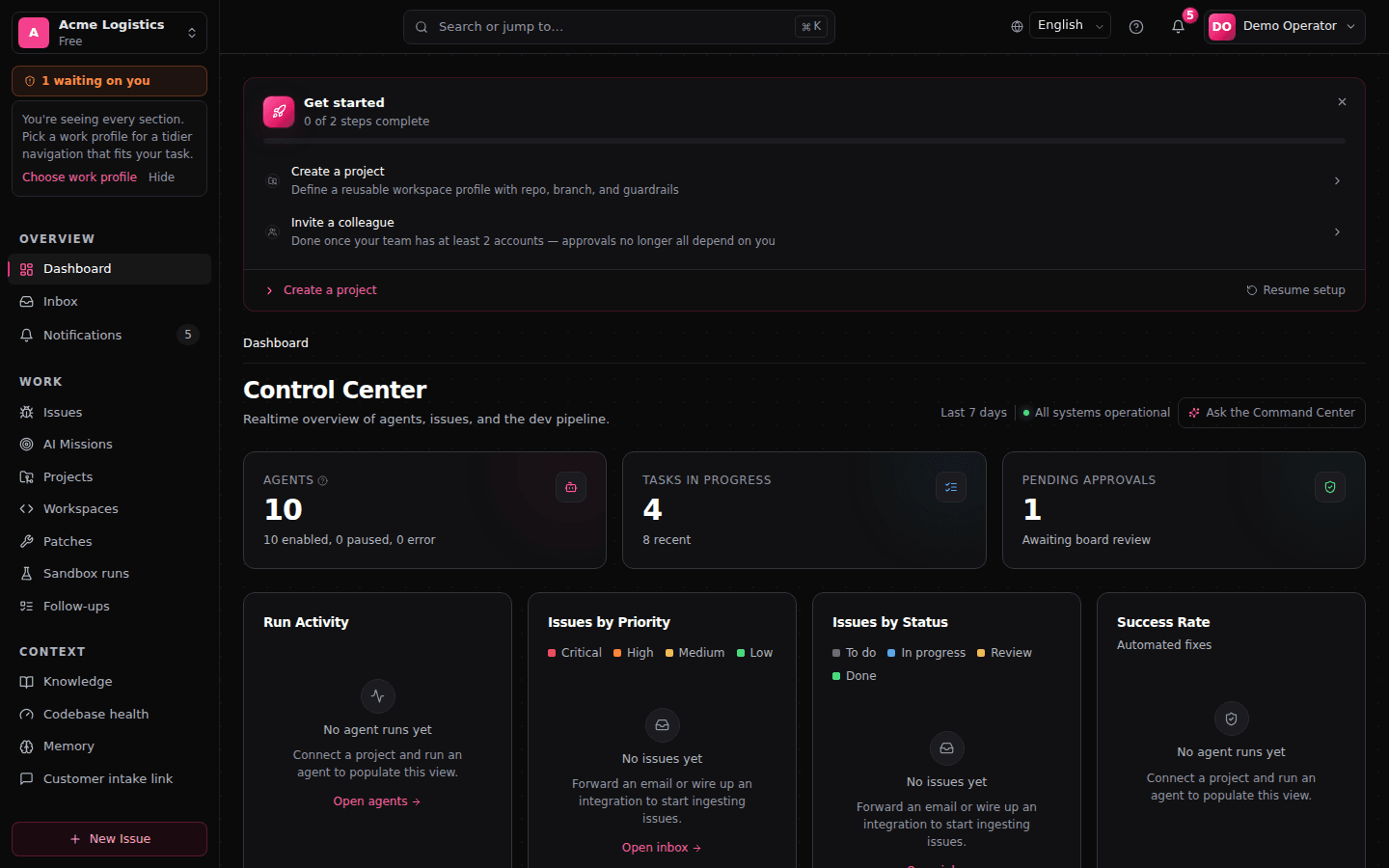
The flow above, in the actual interface: the FixControl control center on demo data — a real screenshot, not a mockup.
AI now has the right information. But is it allowed to act?
You decide what AI may do on its own and when a person has to decide — with rules, checks and approval (governance).
A reply to your customer leaves, by default, only after approval by someone on your team.
A risky code change requires a passing test in an isolated environment, an application that still starts, and a senior reviewer.
Promoting a deployment is only possible after a recorded approval — where this is configured.
Read-only investigation within the project is something AI may do without approval; outward actions are not.
FixControl checks these rules before an action is executed and records every decision.
Start safe and expand later
FixControl reads along with tickets and code and summarizes what is going on. Nothing changes.
FixControl looks for causes: it connects a report to earlier tickets and recent changes in the code.
FixControl writes draft replies and prepares code changes — ready for review, not sent anywhere yet.
Only after approval does an answer, pull request or deployment step leave. This step sits behind a human decision by default; exceptions are something you configure explicitly yourself.
You do not have to switch everything on at once. Start with observing and investigating, and add the next step only when your team trusts it.
What is a shorter path from report to fix worth to your team?
Less searching in support, faster fixes in engineering, and a recorded decision behind every action. Calculate what that means for your team.
See how FixControl works
From scattered information to a prepared proposal, checks on rules and tests, and someone on your team who decides.
- Only the tickets, code and documents that belong to the project
- Specialized AI helpers (agents) for tickets, replies and code changes
- Rules and checks before anything goes to your customers or repositories
- Someone on your team decides where that is needed
Read the video transcript (in Dutch)
AI kent uw organisatie niet vanzelf
AI kan veel, maar weet niet automatisch wat er binnen uw organisatie speelt.
Informatie staat verspreid over tickets, code, gesprekken en documenten.
De juiste informatie per project
FixControl koppelt per project alleen de bronnen die daarbij horen.
Gespecialiseerde AI-agents bereiden werk voor
Gespecialiseerde AI-agents onderzoeken het probleem, analyseren relevante code en documentatie, en bereiden een antwoord, analyse of wijzigingsvoorstel voor.
Controle vóór actie
Daarna controleert FixControl welke regels gelden, of tests zijn geslaagd, welk risico is vastgesteld, en wie toestemming moet geven.
Een medewerker beslist
Een medewerker ziet het voorstel en de controles, en kan goedkeuren, afwijzen of een aanpassing vragen.
Uw systemen blijven de bron
Tickets, code en gesprekken blijven in de bestaande systemen.
Waar ingesteld worden goedkeuringen gedaan via Slack of Teams.
Pas na goedkeuring een pull request
Pas na de vereiste goedkeuring wordt de wijziging als pull request voorbereid.
Zo helpt FixControl u verder
Eerst de juiste informatie. Daarna een voorstel. Pas na controle een actie. Zo helpt FixControl u verder.
See FixControl for your team
Two demos: one for customer questions and email, one for bugs and code.


Bug fixes are one example. The same rules apply to more.
Every project gets a goal. Customer replies, code changes, releases and questions about your documentation run through the same checks, approvals and records. These are the tasks FixControl handles today.
Answer questions about tickets from Slack or Teams and prepare draft replies to your customers, in your house style. Someone on your team reviews by default what goes to the customer.
From a customer report or a known bug to a tested code change, delivered as a pull request — never straight to your main branch.
An approval promotes a paused rollout, with a record of who decided — only available for connected systems that support this.
Investigation is read-only and sits behind approval; every proposed change gets a risk class before anyone decides.
Answers to employee questions, prepared with the documentation and project sources you connect.
The knowledge is already there. It is just everywhere.
The answer to a customer question rarely lives in one place. It sits in earlier tickets, in the code, in a Slack conversation from last month and in documentation nobody can find anymore.
Earlier reports and how they were resolved — in Freshdesk, Jira, Odoo or TOPdesk.
The repositories where the work happens, including recent changes.
Slack and Teams channels where agreements and decisions pass by.
Customer questions and agreements in Gmail or Office 365.
Manuals, procedures and project documents you connect or upload.
What was rolled out and when — where a connected system supports it.
And afterwards: who approved what and why, recorded next to the work so you can look it back up.
AI without this information guesses. FixControl gives AI the right context per project — from tickets, code and documentation — before it proposes anything, and records the decision that follows.
You decide which information belongs to a project
A project in FixControl is a bounded working environment. You connect exactly the sources that are relevant for that task: a mailbox, a Slack or Teams channel, one or more repositories, documentation.
The support mailbox, the invoicing repository and the documentation about invoices. Questions about invoices are answered with this information — not with everything your organization has ever written down.
The app channel in Slack, the app repository and the release documentation. An outage in the app is investigated with the app's code and reports — not with those of invoicing.
This way AI works with the right information per project: not all of your organization's information, but only the information that is relevant and permitted for that task.
This is how FixControl sits between your systems and your people
From bottom to top: your systems stay the source, your people keep the final say.
What FixControl does, in seven steps
- 1You connect the systems you already use.
- 2Per project you choose which information belongs to it.
- 3FixControl investigates with that information: it reads the ticket, the code and earlier reports.
- 4Before an action, FixControl checks which rules apply.
- 5Someone on your team decides — by default about everything that goes to your customers, repositories or production.
- 6Only then does FixControl execute the approved action: an answer, a pull request, a deployment step.
- 7Everything is traceable: who decided, why, and based on which information.
FixControl does not replace your existing systems
A workflow tool executes steps someone built in advance. FixControl first gathers the project's information and then applies the rules and the approval to the proposed work — from ticket to pull request.
Compare with workflow automationA search layer or AI assistant searches everything it can reach and formulates an answer. FixControl uses only the sources that belong to the project — and ties an answer or change to checks and approval.
Compare with enterprise searchYour tickets stay in Freshdesk, Jira, Odoo or TOPdesk, and changes arrive in GitHub or GitLab as ordinary pull requests. There is no new system to migrate to; your team keeps working where it already works.
Compare with ServiceNowFixControl connects the information that is needed, prepares the work and checks what may happen with it.
Verify us before you trust us
What you can verify yourself today
- How FixControl is built and secured is on the security page: isolation per organization, encryption, two-factor authentication, SSO (OIDC) and SCIM — built as scalable multi-tenant SaaS.
- What is finished, what is in preview and what is planned is open on the product page — without “coming soon” promises.
- Every approval is recorded with who decided, why, and what they based it on, in a hash-chained log the database itself will not let anyone edit. On Pro and Enterprise you export it as a signed file that proves it was not altered after export; on the hosted service audit records are kept for a year.
- Prices are public on the pricing page.
What is not there yet — and how we handle that
- Deployment gates are pilot functionality: where you configure one, FixControl records a verdict on a pause your pipeline already holds — it never starts, creates or rolls back a deployment itself. Onboarding is controlled and step by step, because we connect to sensitive systems: every rollout is validated first.
- SOC 2 or ISO certifications are not yet in place. Customers assess the architecture, the checks and the recorded approvals directly.
Three questions readers ask us
Per project you connect the sources that belong to it: a mailbox, a Slack or Teams channel, a ticket system, a repository, documentation. No source is mandatory. FixControl reads along from them; something only goes back — a reply, a status update — after the approval your rules require.
Access follows your own structure: permissions per project and per role, and sensitive categories — such as HR questions — are additionally restricted to assigned reviewers. The AI falls under those boundaries too: what FixControl may do in a project (observe, investigate, prepare proposals, execute approved actions) is set per project, and every action is recorded.
We count on that — which is why, by default, nothing leaves without review by someone on your team: reject or request a revision and nothing has happened. If a change turns out to be wrong after all — say your team rolled the production deploy back — FixControl can reopen the linked Freshdesk ticket, where you switch that on, so support knows the problem is back. And if a connection or check fails, FixControl would rather do nothing than guess: failures are visible per part, not hidden behind one green checkmark.
A guided start, validated per connection
Every new team starts with guided onboarding: we validate each connection on your own data before your team relies on it. Start now and you work directly with us during rollout — and what your team needs next lands on the roadmap.
Talk to us about a guided startGive AI the context of one real project.
Connect your tickets, code or documentation, start with observing and investigating, and see for yourself what FixControl sees. Proposals and approved actions are something you switch on only when your team is ready. Guided onboarding proves each connection before you rely on it.
A guided pilot starts small: one integration, repository access scoped with you, and the approval rules and success criteria for expanding agreed up front. It is credited toward an annual contract if you continue.