AI does the work. Your people keep the decisions.
FixControl is a governance layer that runs on top of the tools you already use. AI classifies, drafts, and proposes; policy and sandbox verification check the work; someone on your team approves anything that reaches your customers, a repository, or production. Every decision is recorded.
How FixControl works
FixControl brings the right information together per project, deploys specialized agents to prepare work, and checks what may happen next.
Read the video transcript (in Dutch)
AI kent uw organisatie niet vanzelf
AI kan veel, maar weet niet automatisch wat er binnen uw organisatie speelt.
Informatie staat verspreid over tickets, code, gesprekken en documenten.
De juiste informatie per project
FixControl koppelt per project alleen de bronnen die daarbij horen.
Gespecialiseerde AI-agents bereiden werk voor
Gespecialiseerde AI-agents onderzoeken het probleem, analyseren relevante code en documentatie, en bereiden een antwoord, analyse of wijzigingsvoorstel voor.
Controle vóór actie
Daarna controleert FixControl welke regels gelden, of tests zijn geslaagd, welk risico is vastgesteld, en wie toestemming moet geven.
Een medewerker beslist
Een medewerker ziet het voorstel en de controles, en kan goedkeuren, afwijzen of een aanpassing vragen.
Uw systemen blijven de bron
Tickets, code en gesprekken blijven in de bestaande systemen.
Waar ingesteld worden goedkeuringen gedaan via Slack of Teams.
Pas na goedkeuring een pull request
Pas na de vereiste goedkeuring wordt de wijziging als pull request voorbereid.
Zo helpt FixControl u verder
Eerst de juiste informatie. Daarna een voorstel. Pas na controle een actie. Zo helpt FixControl u verder.
- Relevant sources per project
- Specialized agents per task
- Rules and checks before execution
- A human decision where needed
- A recorded decision
Five pieces, one control plane
Everything below is shipped and in the product today. Each piece feeds the next: context informs proposals, proposals carry evidence, decisions land in the ledger.
Support intelligence
Understand incidents using your documentation, past tickets and operational context. Ask about existing tickets in authenticated Slack, Teams or the in-app assistant instead of filing a new one.
Operational governance
An 8-domain policy engine sets risk tiers, approvers and limits per scope. AI operates inside those policies; consequential actions stop at approval gates.
Evidence engine
Every proposal carries the tickets, code and documentation it rests on, plus sandbox verification results — so an approver decides on evidence, not on trust.
Mission timeline
One replayable timeline per operation, from intake to delivery, separate from raw logs. Each decision links back to the evidence it was made on.
Command Center
Ask for what you want in your own words, and FixControl works out which of its own operations that is. It is a way in, not a way around: every operation it can run is one the screens run too, with the same permission check and the same approval behind it.
What it looks like
Real screenshots from the product on demo data — no mockups. These are the surfaces your team works in every day.
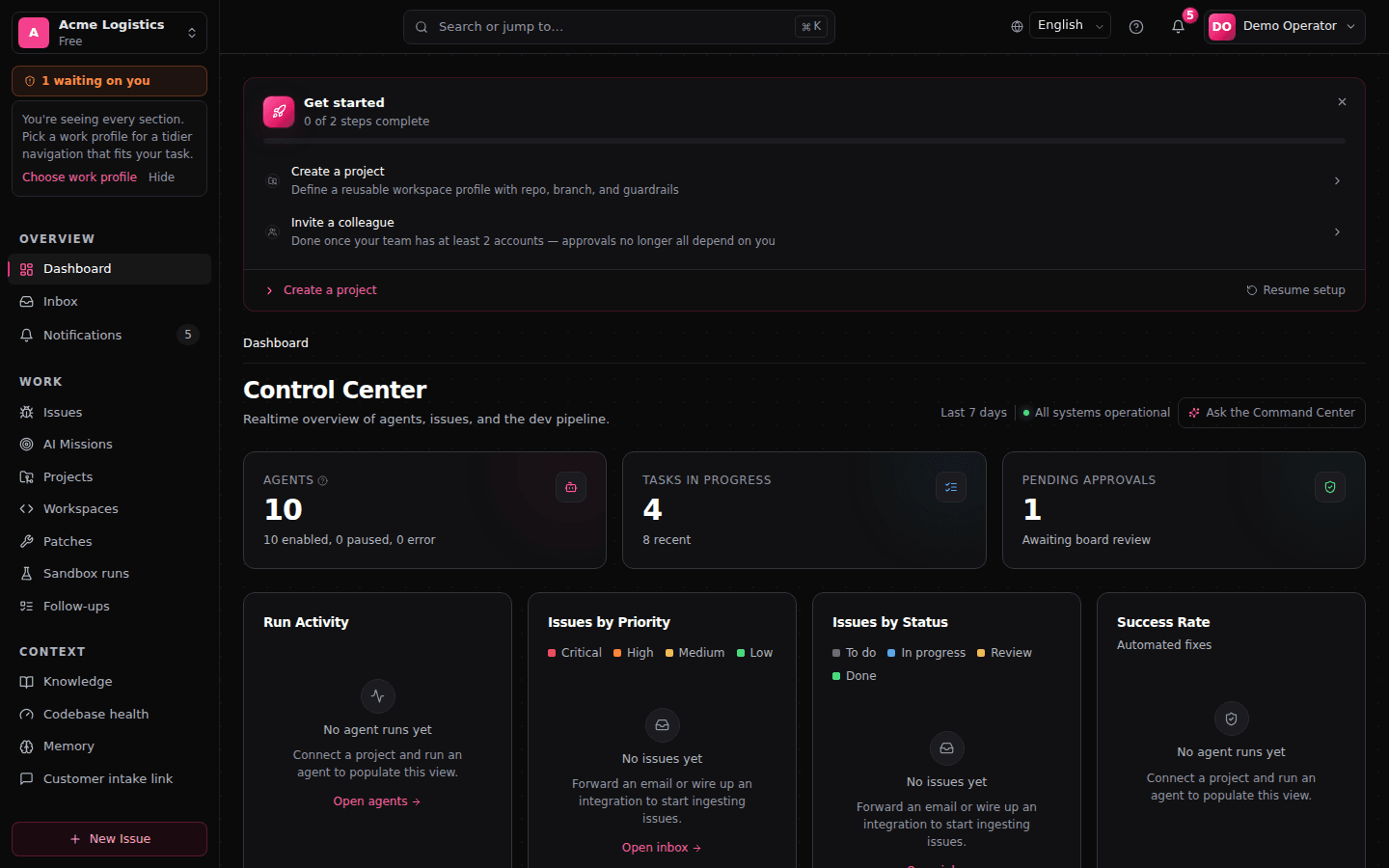
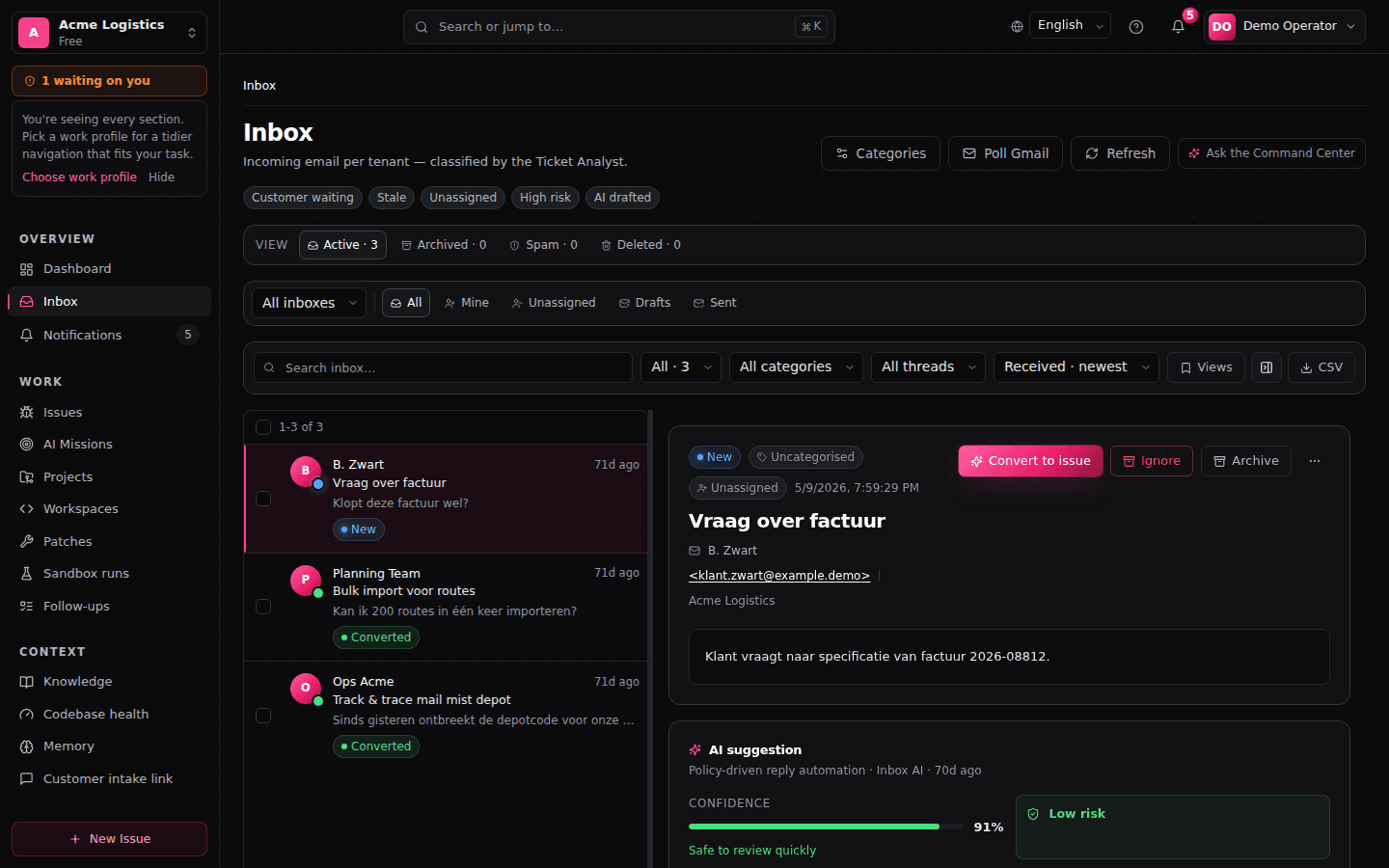
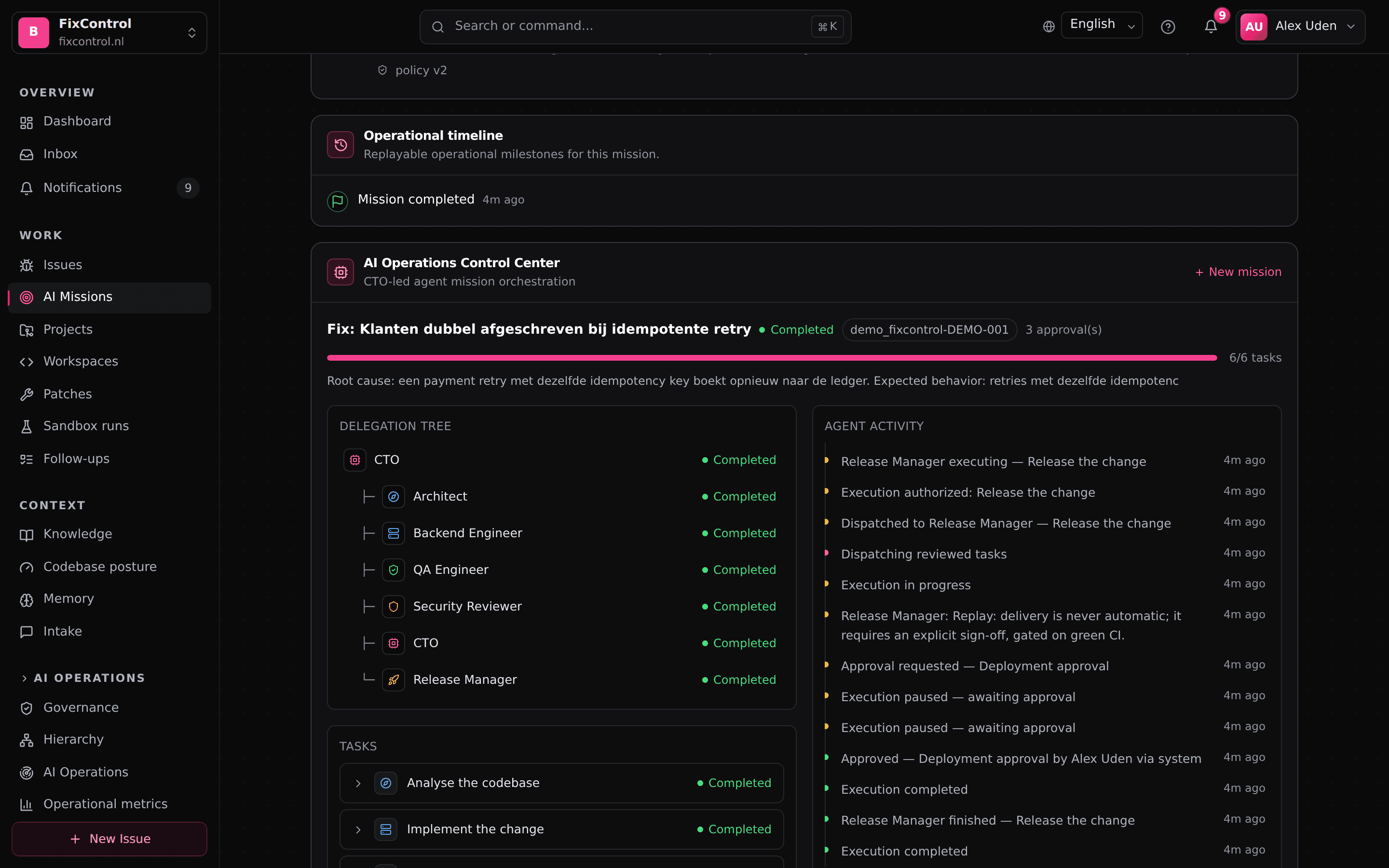
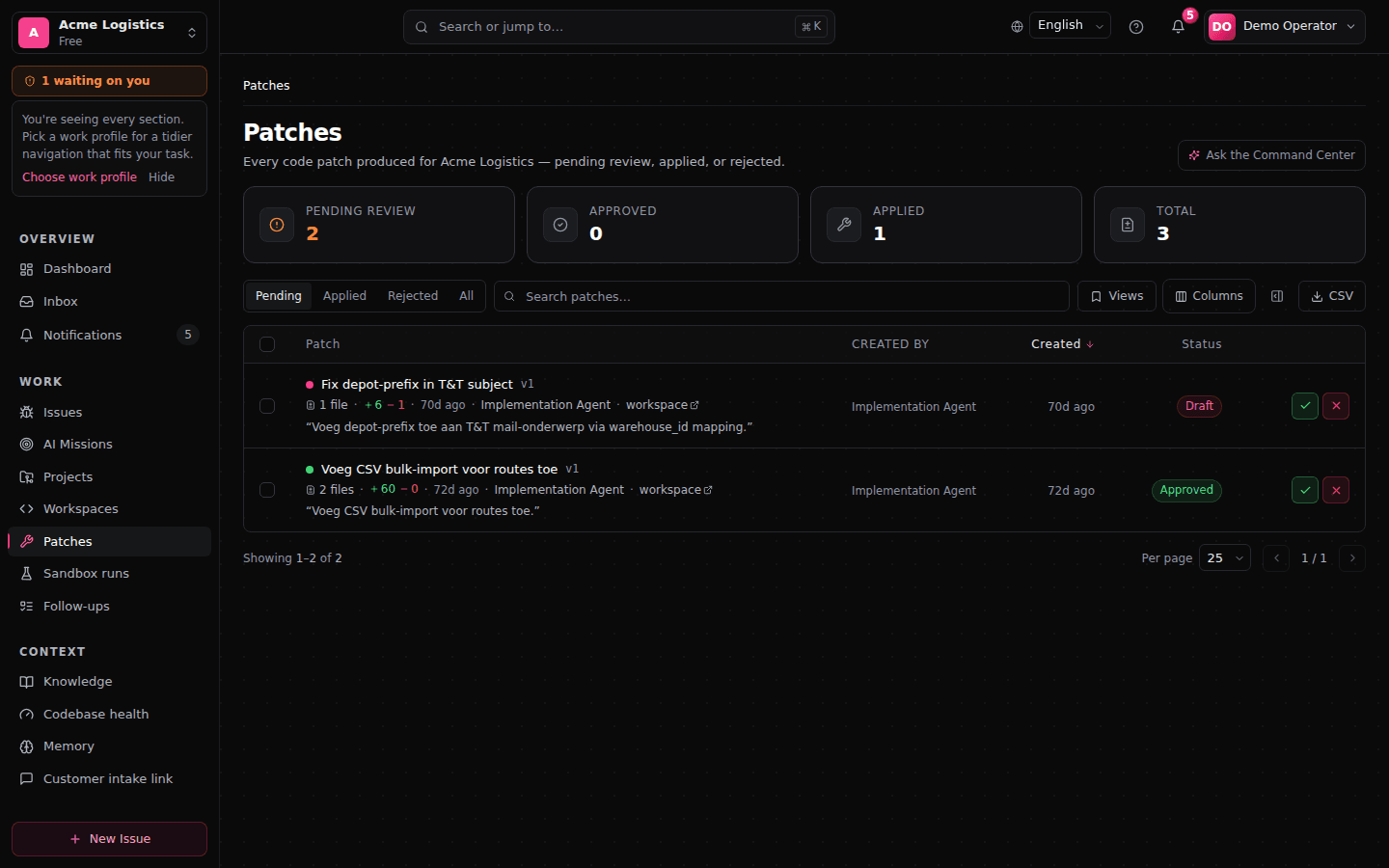
What is shipped, what is configured, what is planned
We label maturity rather than blur it. If something below says preview or roadmap, it is not sold as shipped.
In the product today
- Support → engineering workflow: intake, triage, proposed change, sandbox verification, approval gates, delivery as a pull or merge request
- Pull requests reviewed before they open: when someone opens the pull or merge request for a patch, they first see its title, description and commit message exactly as the git host will receive them, and can edit them. Asking Command Center to apply the latest patch leads to that same review, not around it
- UI tests that actually run: the browser tests a proposed change ships — Odoo QUnit suites and tours, Playwright and Cypress specs, self-contained node test scripts — run in a headless browser in the sandbox, and a goal about the interface only counts as verified by a browser test of that version that covers it. When a UI test cannot run in the environment, the run says so and does not pass. Tests a change adds that the project's own test runner would never pick up — plain unittest classes in an Odoo module, node:test files in a Jest, Vitest or Mocha project — are run on their own, instead of passing by not running
- The AI review only marks a change approved on a green sandbox verdict for that exact version: a run that failed, timed out, went stale or did not prove the start never turns it into an approved change
- Governed customer replies: AI drafts, someone on your team approves what is sent to Freshdesk, Odoo and TOPdesk — and to Jira Service Management where a customer-reply capability is configured and healthy. Direct e-mail to your customers is four-eyes approved: the requester never approves their own message, and any edit invalidates the approval
- Replies in your house style: signatures, reply templates and a tone policy, scoped per mailbox or user — off by default, you decide where they apply
- Ticket-question answering in authenticated Slack, Teams and the in-app assistant
- Command Center — say what you want and FixControl maps it onto its own operations: more than forty of them today, and the list grows with each release. About half only read — what is this project waiting on, why is it not ready, what did that run do, what a skill would do before you switch it on. The rest change something, and each one stops at a confirmation card first: the card names the exact thing that will be written, it is re-read on the server rather than taken from the screen, it can be used once, and your permission is checked again at the moment it runs — and where the operation is a sensitive one, so is a second factor. Which operations those are is the platform's own list, not something the chat decides. What it cannot do is deliberate: no credentials, no disconnecting a provider, no destructive administration, no billing, no editing governance policy. Those stay in the screens, and asking for one is refused in the same words every time and recorded
- Customer management with governed communication: your customers linked to tickets and projects, and every direct e-mail to a customer staged for approval by a second person on your team
- Project roles and memberships: project work sits behind explicit membership and per-role permissions — deny-by-default, rolled out surface by surface
- Guided project setup in plain language: the project overview is one setup checklist, a Connections page groups everything the project is connected to, and step-by-step wizards connect a repository, a support mailbox, a support desk and a chat channel. A connection only counts once a test proves it — a forwarding address, for instance, only once mail has actually arrived. A Project Admin can link the organisation's existing mailboxes, chat channels and support-desk queues to their own project; adding a new company account stays with the organisation's administrators
- Optional LLM-first chat understanding, per project: the model interprets the request — one message may ask for several things and lands on a single confirmation card with numbered steps; execution still waits behind that card and the approvals behind it
- A skills registry for your AI team: import a skill from FixControl's curated catalogue, a GitHub or GitLab repository, a SKILL.md file or pasted text. Every import is scanned — a critical finding quarantines it straight away — and an imported skill cannot be switched on or assigned until someone has reviewed it. A skill is pinned to an exact version, and a pinned version whose content no longer matches its checksum is quarantined rather than silently fetched again. FixControl's own engineering guidance skills stay off until your organisation opts in
- Multiple support mailboxes per organisation (Gmail and Office 365), each linkable to its own project
- Verification for the stacks your teams actually run: PHP (Laravel, WordPress, Symfony, Magento 2) with a real database sidecar, modern .NET solutions including their migrations, Angular workspaces verified with their own tooling and the browser their tests need, and dbt projects checked offline. Where a repository needs Windows tooling that no Linux container can host, FixControl says so by name instead of guessing at a result
- Automatic environment discovery, on by default: for a repository FixControl cannot detect deterministically, facts are read from the repository, the AI proposes an environment as a hypothesis, policy checks it, and the sandbox has to prove it by really running it. Only a run that passes becomes a stored, reusable environment — and you can switch it off to keep every run on the deterministic path
- A green result means the application still starts. Where the proven environment knows how to start the application, a run only counts as green once that application has actually come up and answered — recorded with what was started, on which address, how long it took and against which environment the proof was made. On FixControl's own test lanes — the isolated Docker environment and the hosted cloud sandbox — the application is started, probed and stopped inside the run itself. A runner in your own environment cannot make that proof yet: such a run records that explicitly, with the reason, instead of counting as green. A project that genuinely cannot produce the proof can set it aside, and who did that and when is recorded and shown as its own state, never as a check that passed. Tests that pass while the application no longer boots do not get a green verdict
- Investigation inside the failed test environment, off until you turn it on: when a verification fails, FixControl can run a small, budgeted set of commands in the very environment it failed in — no internet, no access to your systems, a throwaway copy of the code, destroyed straight afterwards — and write its next attempt from what it found instead of from the tail of a log. Every command and its output is kept with the run for you to read. It is off by default because it lets the model choose those commands, which is a call to make for yourself
- Steer a change while it is being made: in the chat where the AI works on a change, you can send an extra instruction while it is still running and it is taken into the work in progress; if the run can no longer take it, it goes out as the next turn instead of being lost
- A patch queue that clears as you decide: pending, approved, applied, rejected and archive views, where pending and approved show only the newest version of a patch and older versions move to the archive. A patch can be set aside into the archive without approving or rejecting it — except the one an open approval is waiting on, which you reject instead — and an action that is refused says why
- Approval ledger and hash-chained audit log with signed export
- OIDC SSO, SCIM 2.0 provisioning, built-in TOTP 2FA, tenant isolation via Postgres row-level security
- One account, several workspaces: access to a workspace is a membership that carries its own role, so you can be an admin in one and an operator in another. Switching is decided on the server, keeps the expiry the session already had, and revoking sessions signs the person out of every workspace at once. Notifications belong to the workspace they are about, and the bell shows how many unread ones wait in your other workspaces
- Deleting an issue, workspace, project or codebase takes it out of active work without destroying the record: the deletion is audited, an admin can restore it, and the approval decisions, verification verdicts and audit history stay either way
- Erasure requests answered without losing the decision record: the person is pseudonymised, the audit fields that named them are redacted while the chain keeps verifying, and “decided by” still resolves — to an erased-user tombstone. Records written before the change are counted and reported back as not redactable rather than quietly skipped
Active only where you set it up
- Argo Rollouts deployment gates: an approval resumes a paused rollout; nothing promotes without a recorded decision
- CI/CD deployment gates (pilot): a pause your pipeline already holds — a GitHub Actions environment review, a GitLab deployment approval or manual job, a Jenkins input step — opens a FixControl approval, and the verdict executes through the host's own primitive
- FC Agent for private infrastructure: an outbound-only service in your own environment, so private Kubernetes, Argo, Jenkins and GitLab connect without being publicly exposed. You download the signed package from its public release, verify the signature and install it yourself
- Jira Service Management customer-visible replies, per configured request type
- Jira reply mirroring and resolve-status push, opt-in per project
- Read-only database diagnostics (PostgreSQL), allowlisted and approval-gated
- Read-only Google Cloud diagnostics: on a bug report FixControl reads Cloud Logging and Error Reporting for context. The access is read-only, the log filters are the ones you allowlist, secrets are masked out of what reaches the AI, and the connector reports its health per capability — connection, logs, errors and BigQuery separately — so a connector that reads logs fine but cannot reach BigQuery says exactly that. BigQuery access is set up and checked but nothing queries it on its own yet: a scan only ever runs when someone asks for one, and it is refused before it runs when it would cost more than the ceiling you set
- Where configured, a proposed change is tested next to the database, cache and background services the application needs. Those services are started fresh for that one run, in one isolated network with no internet access, and they never get the repository mounted — only the container running the tests does. Everything is cleaned up afterwards, and every passed run records the exact versions it passed against
- Environment settings per project, written by the people who know the application: the start command, an extra service, a build step. They shape the environment FixControl tries, they are judged by the same rules the AI's proposal is judged by, and the run still has to prove them — a start command that never answers is a failed attempt, not a verified environment
- Validation strategy per project (pilot): which lane a project's changes must pass — the isolated Docker lane, your own environment, or Docker first and then your own environment. Set up with your team during pilot onboarding, and a required lane is only satisfied by evidence from that lane
- In-cluster validation through the FC Agent (pilot): the same validation and the same evidence, executed by a runner you install inside your own Kubernetes environment. The runner works in a short-lived test namespace, cannot touch rollouts, and your Kubernetes credentials stay on your side
- Live previews, off until you switch them on: after a run proves an environment, someone with project administration rights can open the running application for a limited time to signed-in colleagues who have read access to that project. No port is published, there is no public link, and a reviewer's verdict is recorded next to the automated result — never instead of it. Whoever started a preview gets an in-app notification when it is ready or when it failed to start
Early, labelled as early
- DevOps observe-and-govern: pipeline and deployment event ingest with compliance export
Planned — not shipped
- SAML SSO (OIDC and SCIM are the shipped identity integrations; SAML is on the roadmap)
- Deployment execution beyond a recorded verdict on an existing pause — FixControl does not start, create or roll back deployments
- AI-assisted incident response
Built for teams that want AI with control
FixControl connects to sensitive operational systems, so every rollout gets guided onboarding: a clear scope, governance validation, and connection tests that prove each integration works before you rely on it — set up together with your team. Here's who gets the most out of it.
Support and engineering teams
Organizations evaluating governed AI workflows across a helpdesk, a tracker, chat and a code host — Freshdesk, Jira, Odoo or TOPdesk, Slack or Microsoft Teams, GitHub or GitLab.
Rollouts start with a pilot
A pilot defines the first workflows, integrations, approval gates and success criteria. After validation, teams expand usage across seats, integrations, action volume and additional governed workflows.
Not a replacement for your team
FixControl does not remove humans from the loop — it puts them at the decision points. Approvers remain responsible for what they approve.
What the AI may do on its own — and what it may not
Without approval, the AI classifies, summarizes, drafts, proposes, analyzes and prepares changes. Customer-visible replies, tracker comments that leave your own organization, pull requests and deployment promotions wait for an approval. And we do not promise hallucination-free AI — we put evidence and a person in front of every consequential action.
See a governed operation run end to end
A 15-minute walkthrough on demo data — no production systems required. Pilots start with one integration and clear boundaries.