This one stays on screen on purpose. Command Center can tell you which workspaces you may enter and switch you between them, but users, project members, project roles and workspace memberships are not configurable by asking.
Who does what
Most user management is in the hands of your organization admin — a user with the Admin role in your workspace. A few things touch more than one workspace or the platform itself; those are done by FixControl platform staff (platform admins) on request.
| Task | Your organization admin | FixControl platform staff |
|---|---|---|
| Create, edit, deactivate and delete users | Settings → Users. | — |
| Set a user's role in your workspace | Settings → Users → Edit. | — |
| Add project members and set project roles | Project → Members. | — |
| Require 2FA for everyone | Settings → Security → Organization security. | — |
| Give an existing user access to a second workspace | Ask FixControl. | Grants, changes or removes the membership. |
| Reset a lost authenticator | Ask FixControl. | Resets the 2FA enrollment. |
| Single sign-on (OIDC) and SCIM provisioning | Supply your identity provider details. | Configures the provider and issues the SCIM token. |
| Switch on project authorization or connector policy | Ask FixControl. | Switches it on for your workspace. |
| Create another workspace for yourself | From the workspace switcher. | Creates workspaces with plan and domain on a customer's behalf. |
Workspaces and accounts
Each organization is a tenant, shown in the product as a workspace (not to be confused with the agent chat session of the same name, see Workspace). A workspace owns its issues, agents, knowledge, AI memory, audit log and inbox. Workspaces cannot read each other's data; see Security & audit.
One account, several workspaces
An account is global: one e-mail address, one password, one two-factor enrollment. Access to a workspace is a membership, and one account can hold several.
- Home workspace — where the account was created. Sign-in lands there.
- Membership — one per workspace the user may enter, each with its own role. The same person can be an Admin in one workspace and an Operator in another.
- Active workspace — a session is scoped to one workspace at a time. See Switching workspaces.
A user created under Settings → Users, by single sign-on or by SCIM gets a home membership in your workspace. A membership in any further workspace is added by FixControl platform staff (see Access to a second workspace).
Adding users
Settings → Users is visible to Admins only. There is no e-mail invitation: an Admin creates the account directly.
- Click Create user.
- Fill in Name, Email, an initial Password (at least 8 characters) and the Role:
- Operator — view and work (the default) - Manager — view, assign, approve - Admin — full access
- Pass the initial password to the new user through a channel you trust. They can change it under Settings → Security → My security.
The new user always lands in the workspace you are in; there is no way to place someone in a different workspace from here.
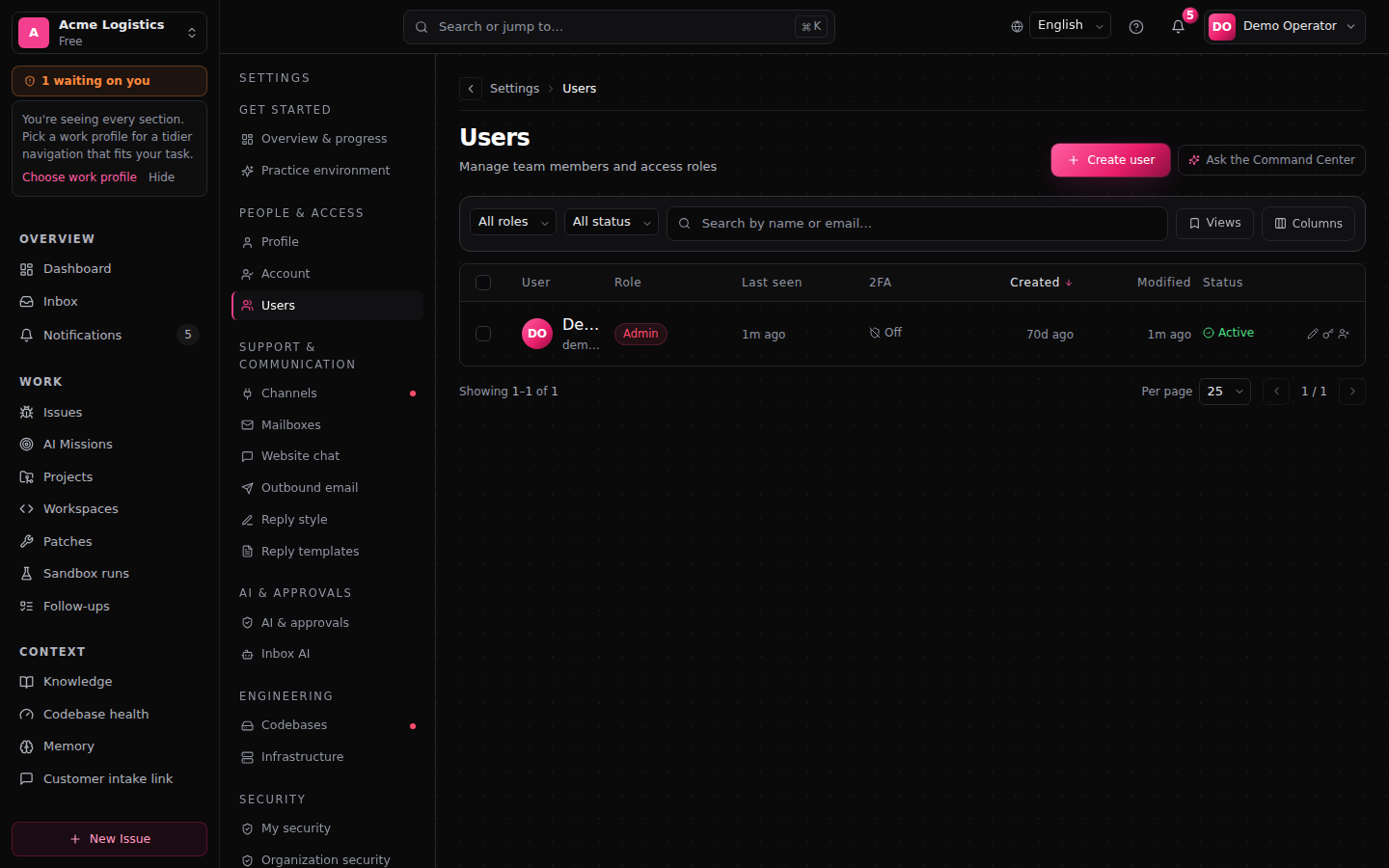
What the users list shows
The list shows the members of the workspace you are in, including guests whose home workspace is another one. Columns: user, role in this workspace, Last seen (the most recent successful sign-in), status and whether 2FA is on. You can search by name or e-mail, filter by role and status, save views, and select several users to activate, deactivate or export them at once.
Changing, deactivating and deleting
Per user, the actions menu offers Edit, Reset password, Deactivate / Activate and Delete.
- Changing a role applies to your workspace only. A guest's role in their home workspace is untouched.
- A role change, deactivation or deletion ends the user's sessions, so the change applies immediately rather than at session expiry.
- Deactivate blocks sign-in and keeps the account, so you can activate it again later.
- Delete removes the account permanently. Issues and history stay; assignments to that user remain as references. You cannot delete your own account.
To sign a user out without changing anything else, use Revoke sessions under Settings → Security → Organization security. It signs them out of every workspace, not only yours.
Roles
Roles are hierarchical: Admin includes everything a Manager can do, and Manager includes everything an Operator can do.
| Role | Can |
|---|---|
| Admin | Everything, including creating, editing and deleting users; managing agents and codebases; organization settings; retention windows; rolling back an applied patch. |
| Manager | Change settings (including knowledge sources); manage integrations, connectors and intake; approve, reject and apply gates and patches; approve customer communication and set auto-send; read and export the audit log; edit and assign skills; run verification and edit or waive a verdict. |
| Operator | View the workspace; work on assigned items; create work sessions; start and cancel verification runs; draft customer communication and request sending. Reads only issues in projects they are a member of, issues assigned to them and issues they created. No approval rights. |
Permissions for HR, development governance and restarting infrastructure come only from project roles, never from the workspace role. See Project access.
Many sensitive actions also need a session confirmed with two-factor authentication; see Two-factor authentication.
Knowledge and AI memory
- Knowledge sources: every signed-in user can see the list. Adding, deleting and scraping sources and accepting suggestions requires Admin or Manager. See Knowledge.
- AI memory: every member of the workspace, whatever their role, can currently read and edit both the global and the project memory. Deletions are audited. Keep that in mind when you decide who gets an account. See AI memory.
Access to a second workspace
Giving an existing user access to another workspace is done by FixControl platform staff only. There is no screen for it in your settings and no invitation flow; ask FixControl, naming the user, the workspace and the role.
- The user must exist and be active, and the target workspace must be active and not scheduled for deletion.
- A role change or removal signs the user out of all sessions. They sign in again and pick up the new state.
- A home membership cannot be removed. Deactivate or delete the user instead.
- Every grant, role change and removal is audited.
Creating another workspace
An Admin of an existing workspace can create a new workspace from the workspace switcher (Manage workspaces):
- Name only. Plan, environment and domain are not chosen here; FixControl arranges those.
- You become its Admin, and you need a 2FA-confirmed session to create it.
- Names are unique; a name that is already taken is refused.
- There is a per-user limit on how many workspaces you can create this way.
- Creation is audited. You stay in the workspace you started from; switch to the new one when you are ready.
Project access
Inside a workspace, people can also be members of individual projects with a project role.
Project roles
Two roles are built in:
- Project Admin — shown as Project administrator. Manages the project's members and its project-level setup, within the limits under What a Project Admin may set up.
- Project Member — shown as Contributor. Reads project data and does the work: drafts and requests communication, runs workflows, uses the project's connections.
Custom roles are built from a fixed catalogue of permissions; there are no free-form permissions. The product describes a custom role by what it can do: one that can approve but not manage members is shown as Approver, one that can only read as Viewer.
Adding project members
Open the project and go to Members:
- Add someone — pick an existing user by e-mail, choose a role and, optionally, an end date for temporary access.
- Invite someone new — Admins only. This creates a workspace account with a password and adds it to the project in one step (Create account and add). No e-mail invitation is sent.
Rules that always apply:
- You cannot change your own membership.
- A project always keeps at least one active member who can manage members; a change that would remove the last one is refused.
- A membership past its end date, suspended or revoked grants nothing.
When project authorization is on
Project authorization is off by default. In that mode the workspace roles above decide access and project roles add project-specific permissions. FixControl platform staff can switch it on for your workspace on request; it is not a setting you toggle yourself.
When it is on:
- Acting on project data requires an active membership whose project role grants the permission. Without it, the project is hidden — a guessed link returns "not found".
- Admins and Managers keep workspace-wide reach; each time they use that bypass on an action, it is audited.
- Operators never bypass: their access runs entirely through project memberships.
- A few sensitive actions, such as approving external customer communication, require a real project membership even from an Admin.
What a Project Admin may set up
- May: link or unlink an existing company mailbox, chat channel (Slack, Teams) or support queue (Freshdesk, Odoo, TOPdesk, Jira, Linear) to the project, behind the same 2FA check as an Admin; test the connections the project uses; manage the project's members.
- May not: create new company connections or change their credentials, rename the project, change its approval rules, or manage code and deployment bindings. Those stay with the organization's Admins and Managers.
See Projects → Setting up a project.
Connector policy
A stricter connector policy is available: external writes only through connections bound to the project, plus data classification and rate and cost limits. It is off by default and switched on per workspace by FixControl platform staff. Once on, an authorization check that cannot be completed refuses the action rather than allowing it.
Sign-in methods
| Method | Used by |
|---|---|
| E-mail + password, with optional 2FA | Organizations without an enterprise identity provider. |
| OIDC single sign-on | Organizations with an identity provider. |
Both can run side by side during a migration.
Two-factor authentication
FixControl has built-in two-factor authentication: an authenticator app (TOTP) plus 10 single-use recovery codes.
- Your own 2FA: Settings → Security → My security.
- Requiring it for everyone: an Admin who has 2FA on their own account turns on Require 2FA for all members under Settings → Security → Organization security, card Workspace two-factor policy. Members without 2FA are taken to setup at their next sign-in. Changes to the policy are audited.
- Admins are not forced to use 2FA unless that policy is on. FixControl platform staff always need 2FA.
- Sensitive actions — user management, settings, agents, codebases, integration and intake management, rolling back a patch, retention, waiving a verification verdict, purging governance data — need a 2FA-confirmed session whenever the user has 2FA enrolled or the policy requires it.
- Lost authenticator: use a recovery code, or ask FixControl platform staff to reset the enrollment.
- Single sign-on users get their MFA from the identity provider instead.
SSO with OIDC
Single sign-on is configured by FixControl platform staff on request; there is no self-service screen. Send FixControl your identity provider's issuer, client id and secret, and tell them:
- which e-mail domains may sign in;
- whether new users should be created on first sign-in (just-in-time provisioning) and with which default role.
At sign-in FixControl checks the issuer, audience, nonce, expiry and signature, uses one-time state with PKCE, and checks the e-mail domain against your list. A sign-in whose e-mail matches an existing user is linked to that user; otherwise a new user is created only if just-in-time provisioning is on and the domain is allowed.
MFA for these users comes from your identity provider, replacing FixControl's own 2FA for that provider's sign-ins. SAML is on the roadmap, not available today.
SCIM 2.0 provisioning
If your identity provider can push users (Okta, Microsoft Entra ID, Google Workspace and others), FixControl platform staff issue a SCIM token for your workspace on request and give you the endpoint. You configure the SCIM connector in your identity provider with that endpoint and the token as a bearer token, and choose which users and groups to push.
- Users and groups can be listed, created, updated and removed; the standard discovery endpoints are available.
- A provisioned user gets a home membership in your workspace.
- SCIM cannot add an existing user to a second workspace.
- Groups are stored but not mapped to roles. Set roles per user under Settings → Users.
Deprovisioning
When your identity provider removes a user or sets them inactive:
- the user is deactivated (not permanently deleted);
- all their sessions are revoked;
- the event is audited.
Deactivating under Settings → Users has the same effect, and the user can be activated again.
FAQ
Can a user belong to two workspaces? Yes, with a different role in each. Extra memberships are granted by FixControl platform staff — see Access to a second workspace.
Can I invite someone by e-mail? No. An Admin creates the account with an initial password, under Settings → Users or from a project's Members page.
What happens to issues when I delete a user? They stay. Assignments to that user remain as references.
How do I make someone a FixControl platform admin? You don't — that flag is for FixControl staff only and cannot be set from your workspace.
Can my identity provider add a user from another organization to my workspace? No. SCIM requests are limited to your own workspace.
Can I keep password sign-in after enabling SSO? Yes, during a migration. Stop issuing passwords once SSO is fully rolled out.