You can ask for this instead of navigating to it. Say "remember this" and Command Center stores a document you give it, or reads one web page and stores it. Ask "what do you know about us?" and it lists the sources (titles and metadata only, never contents), including which are still being processed. Ask "what would you read if I asked X?" to see the passages the agents' own search would find. Importing a whole site stays on this page, where the page limit and the result are visible.
What knowledge is for
Knowledge is the reference material the agents read before they answer or propose a change: your documentation, FAQs, a scraped help site, or what FixControl learned from a linked codebase. The intake agent uses it to classify issues, the reply agent to draft customer replies, and the developer agents to understand context. Without knowledge, agents work from the ticket text alone.
FixControl uses the connected project sources to prepare an answer. Your knowledge is only searched inside your own organisation; another organisation never sees it.
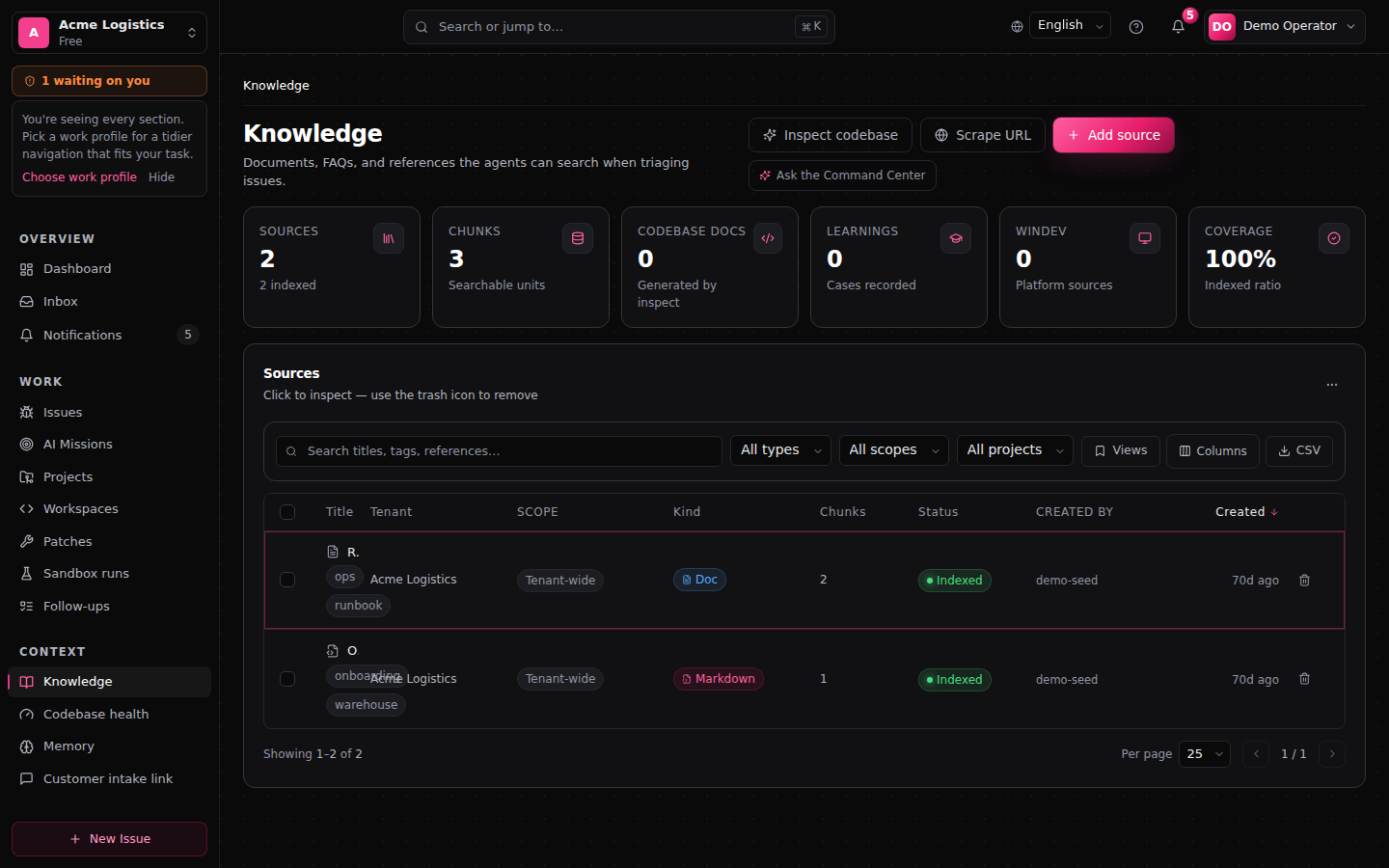
You find it under Knowledge in the main menu (/knowledge).
Who can do what
| Action | Who |
|---|---|
| View the source list, open a source, use Check what FixControl would read | Every signed-in member |
| Add source, Scrape URL, delete sources | Administrators and managers |
| Approve, reject or edit suggested drafts | Administrators and managers |
| Inspect codebase | Administrators, on a plan that includes codebase analysis |
The buttons are visible to everyone. Without the right role, saving is refused with a permission message.
Where knowledge comes from
Knowledge is something you upload, paste or scrape, plus what FixControl generates itself. There is no live connector to a wiki or document platform: to use content from one, export it as text or scrape its public pages.
| Kind | Where it comes from |
|---|---|
| Markdown, Doc, FAQ, URL, PDF | Added by you with Add source: upload a text file (Markdown, TXT, JSON or CSV) or paste the content. The kind is a label; files are always read as text, so PDF files cannot be uploaded directly. Paste the text instead. |
| Scraped pages | Added with Scrape URL. Each page becomes its own source. |
| Analysis (.wda), Technical document, Procedure reference | WINDEV context. The analysis and procedure reference are stored as a reference only (a pointer agents can look up, without indexed content). |
| Architecture, Module Card, Issue Map | Generated by Inspect codebase. Not edited by hand. |
| System Learning | Recorded by FixControl itself. See System learnings. |
Scope: who may use a source
Every source has a Scope, shown in its own column:
- Tenant-wide: available to every project in your organisation. Use this for general material such as your product FAQ.
- Project: only available to agents working on that project.
- Codebase: generated from, or linked to, a specific codebase.
Tenant-wide sources can end up in answers for any project. Put project-specific documentation on the project instead.
When an agent searches, it gets the sources of the issue's project plus your organisation-wide sources, never the sources of another project. This is a fixed platform rule; you do not configure it. Search combines meaning-based matching with keyword and fuzzy text matching, so a source can be found even if the question uses different words.
Adding a source
- On Knowledge, click Add source. To add a source for one project, open the project and add it there: the scope is then fixed to that project, and you can optionally pick a codebase (default Project-wide).
- Pick the Kind.
- Fill in a Title and, optionally, Tags (comma separated). The Tenant field is filled in for you; leave it as it is.
- Drop a file on the upload area or use browse files, or paste the text in Content. For a reference-only WINDEV kind, fill in Reference instead.
- Click Index source (or Add reference for a reference-only kind).
The source appears with status Processing while FixControl prepares it for search, and Indexed once agents can find it. Failed means it could not be processed; delete it and add it again, or paste cleaner text.
Scraping a website
- Click Scrape URL.
- Enter the URL and, optionally, Tags (comma separated).
- To also import linked pages, tick Crawl linked pages (same path) and set Max pages (default 30, at most 100). Only links under the same path are followed.
- From a project you also see Make available only to {project}: leave it ticked to keep the pages project-scoped.
- Click Scrape & index (or Crawl & index when crawling).
When it finishes you see Pages crawled, Sources indexed and Errors, with the pages that were indexed and the URLs that failed. Redirects are followed and every redirect target is checked again before it is fetched; addresses inside private networks are refused. A scraped page is a snapshot: scrape it again when the site changes.
Inspecting a codebase
Inspect codebase turns a linked codebase into searchable knowledge: an Architecture summary, Module cards and an Issue map. The developer agents use these, and they are attached to workspace chats for that codebase.
- Click Inspect codebase (disabled until a codebase is linked; see Codebases).
- Pick the codebase. The dialog shows what was generated before and when.
- Click Run inspection, or Re-inspect to replace the earlier output.
The generated sources appear in the list under the type filter Codebase docs. Codebase health for each codebase is on Codebase health (/knowledge/posture).
Check what FixControl would read
The panel Check what FixControl would read runs the agents' own search for a question you type, without changing anything. Click Try it to see which passages the agents would find, in which order, why each one ranked where it did, and how many sources were out of reach for that question (for example because they belong to another project). If nothing comes back, add the document that answers the question.
A passage marked as indexed by an older model ranks lower until FixControl re-indexes your knowledge. Re-indexing is done by FixControl; you cannot start it yourself.
Suggested drafts
On /knowledge/suggestions FixControl proposes knowledge articles drafted from resolved tickets. This only happens where learning from tickets is switched on for an integration; it is off by default.
Each draft shows its origin, language and content, with Edit, Reject and Approve. Only Approve turns a draft into an indexed knowledge source; nothing on this page publishes on its own. The suggestions page is in English.
System learnings
FixControl records some outcomes as knowledge of kind System Learning, scoped to the project:
- Patch outcomes: when a patch is applied, rejected, or its revision loop dead-ends, the case is recorded automatically so later work on the same project can learn from it.
- Resolved tickets: from Freshdesk, Jira, Odoo or TOPdesk, only when you switch on learning for that integration (for Freshdesk: Capture resolved tickets as project learning). Off by default. Personal data is removed first, and tickets without a project are never captured.
Filter on System Learning to see them. Recorded approval decisions are not part of knowledge and are not given to agents as context.
Knowledge for the website chat
For the website chat you group documentation into Knowledge sets under Settings → Website chat. Each set has a visibility: Public, Internal or Restricted. A public chat reads public sets only, an internal chat reads public and internal sets, and restricted sets are read by no chat. A set contains exactly the sources you add to it: uploading a document to Knowledge does not put it in a set.
Operator surface
The source list has the usual list tools:
- Search on titles, tags and references, and filters on type, scope, project and codebase.
- Views: save the current filters as a named view, rename, duplicate or delete views, and mark one as your default.
- Columns to show or hide columns, and CSV to export the current filter set.
- Keyboard:
j/kto move,/to search,Enterto open,xto select,Shift+xto select a range,Cmd/Ctrl+Ato select every visible row,Escto clear. See Keyboard & command palette. - Delete: per row (with confirmation) or for the selected rows. A selection covers the current page; it is cleared when you change page or filters. Deleting removes the source and its chunks, so agents stop finding it; answers that already cited it keep their recorded citation.
When something goes wrong
- The agents don't seem to know something. Use Check what FixControl would read with the customer's question. If nothing comes back, the document is missing or still Processing; if it belongs to another project, add it to the right project or make it tenant-wide.
- Saving or scraping is refused. You need the administrator or manager role; Inspect codebase needs the administrator role and a plan with codebase analysis.
- A scrape reports errors. The page may block automated access, need a login, or redirect to an address that is refused. Paste the content with Add source instead.
- Pasting raw e-mail threads. They match loudly and crowd out real answers. Summarise first.
FAQ
What's the difference between codebase sources and your own documents? Your documents (pasted, uploaded, scraped) are mainly for the reply and intake agents. Codebase sources are produced by Inspect codebase for the developer agents; you don't manage them by hand.
What does the status Reference mean? The source is stored as a pointer only: the content isn't indexed, but agents can still look it up by name.
Can I scope a source to a project or codebase? Yes: add it from the project, or pick a codebase there. Retrieval respects the scope.
Related: Replies to customers, AI memory, Projects.