What memory is
Memory is a short set of rules, written in Markdown, that FixControl gives to every agent before it starts on a task. Memory doesn't change what an agent is allowed to do (that is governance); it changes how the agent decides and answers. Use it for things that should always apply: tone of voice, prioritisation rules, conventions, hard prohibitions.
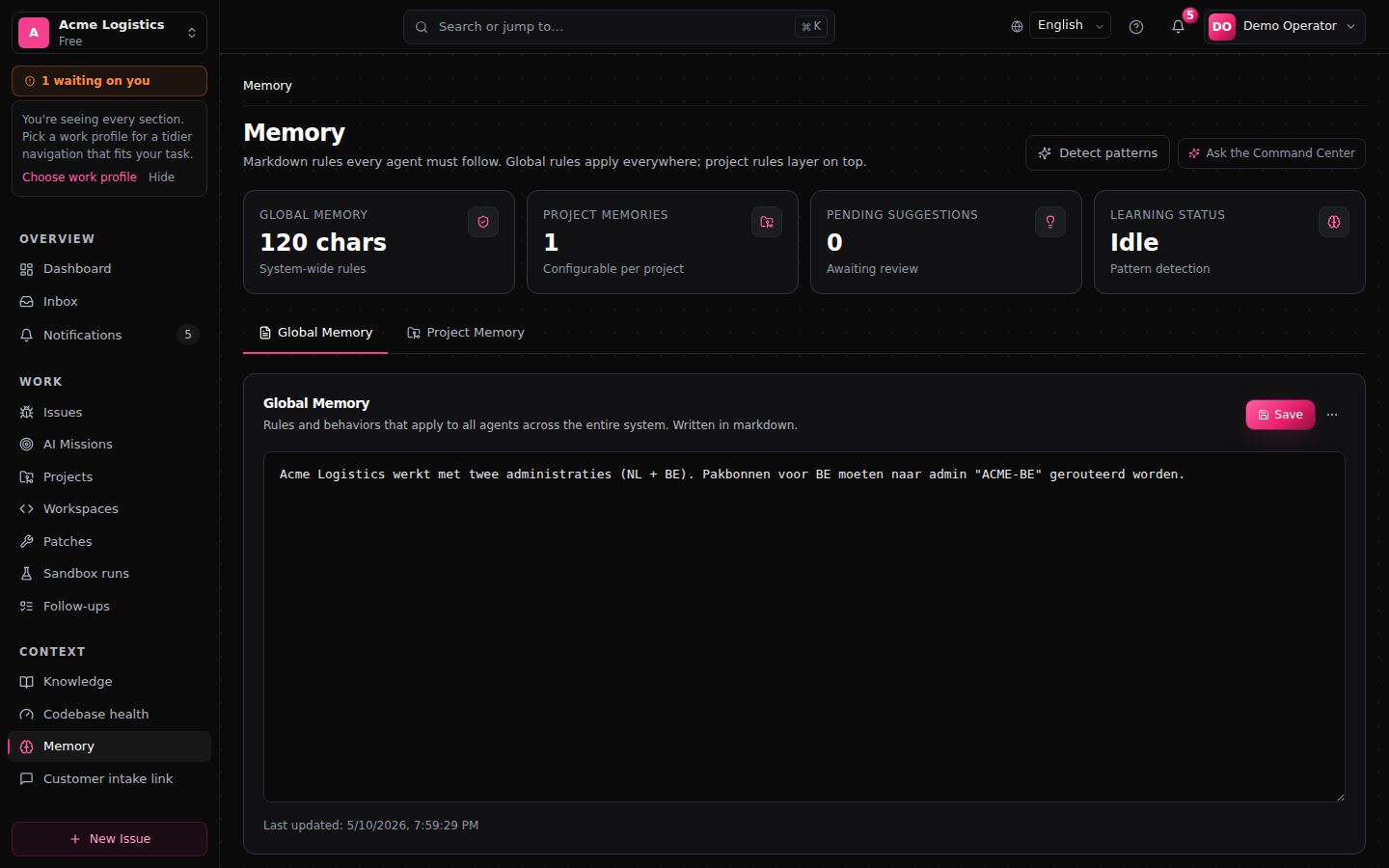
You find it under AI memory in the main menu (/memory). The page header reads: "Markdown rules every agent must follow. Global rules apply everywhere; project rules layer on top."
Who can change memory
Today every signed-in member of your workspace can edit and save memory and accept or reject suggestions, whatever their role. Memory shapes every agent run, so administrators should check it regularly. Each editor shows Last updated with the time of the last save. Saving an editor is not recorded in the audit log; removing a memory entry is.
Global and project memory
There are two tabs, each with its own editor and Save button:
- Global Memory: applies to every agent, every issue and every project in your organisation. Use it for organisation-wide policy.
- Project Memory: only given to agents working on that project. Pick the project with Select a project…. Use it for project conventions: deploy procedures, known API quirks, ownership per component.
The two add up: project memory does not replace global memory, it adds to it.
Writing and saving rules
- Open Global Memory or Project Memory (and select the project).
- Write your rules in Markdown in the editor. The empty editor shows an example layout.
- Click Save. The button briefly shows Saved.
Good memory is short, normative and self-contained: one rule, one point. For example:
Triage critical bugs within 1 hour. Any bug with priority critical is assigned and classified within one hour of arrival.Avoid vague phrasing ("be careful"), long explanations and history. If a rule describes a change ("we don't do X anymore"), write the current norm instead ("do Y").
How agents use memory
Before an agent starts, FixControl puts your global memory first and your project memory second, ahead of the workspace instruction, the issue, the code context, the retrieved knowledge and the guardrails. As a result:
- Agents follow your rules without you repeating them in every request.
- Behaviour stays consistent across all agents.
- FixControl counts how often each rule is used.
Memory Suggestions
Under Memory Suggestions FixControl proposes rules it detected from real usage. Each suggestion shows its type, where it came from, a confidence percentage and whether it is global or for a project.
- Click Accept to add the suggestion to memory, or Reject to discard it. An accepted suggestion becomes a separate rule; it is not added to the editor text.
- Click Detect patterns (top right) to scan issues and agent runs for new suggestions.
- Open Suggestion History to see the History of suggestions accepted or rejected earlier.
Besides suggestions, FixControl can also add rules on its own after a clear signal: an issue being closed, a review decision, or someone correcting an agent's output. Rules it is confident about are added directly; less certain ones appear under Memory Suggestions. Rules added this way do not show up in the editor text. Agents always receive what you last saved in the editor, together with these separate rules.
The stats at the top show the number of projects (Project Memories), the number of open suggestions (Pending Suggestions) and Learning Status (Active while suggestions are waiting, otherwise Idle).
Memory vs knowledge
- Memory is always given to the agent: short, normative, shaping behaviour. Keep it small.
- [Knowledge](/docs/en/user/knowledge) is searched when needed: reference material, documentation, long-form content.
Rule of thumb: if it should always apply, it belongs in memory. If it's only sometimes relevant, it belongs in knowledge. What FixControl learns from resolved tickets and patch outcomes is stored as knowledge of kind System Learning, not here.
When something goes wrong
- The page says it couldn't load memory data. Some panels may be incomplete; click Retry.
- An agent ignores a rule. Check that it is in the right tab (global or the issue's project) and that it is short and unambiguous. Long, conditional rules are followed less reliably.
- A rule appeared that nobody remembers writing. Look in Suggestion History, and remember that every member can edit memory.
FAQ
Can I see who changed memory? Not per edit. The editor shows when it was last saved, and Suggestion History shows accepted and rejected suggestions.
Does memory replace governance? No. Memory steers how an agent works; what an agent may do, and which approvals it needs, is set under Governance & policy.