Shared responsibility
FixControl is a hosted service. Two groups of people hold security controls, and this page keeps them apart:
- Your organization admin — a user with the Admin role in your workspace. Some audit and approval tasks are open to Managers too; this page says where.
- FixControl platform staff (platform admins) — FixControl employees who operate the service. Several controls are deliberately not self-service and are handled by them on request.
| What | Your organization admin | FixControl platform staff |
|---|---|---|
| Users and roles in your workspace | Create, edit, deactivate and delete users and set their role under Settings → Users. | — |
| Two-factor policy | Turn on "Require 2FA for all members" (Settings → Security → Organization security). | Reset a lost authenticator. |
| Ending sessions | Revoke sessions for one user or for your whole workspace. | Platform-wide revocation; rotating the session signing keys. |
| Access to a second workspace for an existing user | Ask FixControl. | Grant, change or remove the membership. |
| SSO (OIDC) and SCIM provisioning | Supply your identity provider details and ask FixControl. | Configure the provider and issue the SCIM token. |
| Project authorization and connector policy | Ask FixControl; manage project members once it is on. | Switch it on for your workspace. |
| Audit log | Read it, export it (Pro and Enterprise plans), set the retention windows your organization enforces. Managers can read and export too. | Run the hourly chain verification; set the platform-wide audit window. |
| Erasure requests (GDPR) | Submit the request. | Carry it out, with two platform admins. |
| Deleting the whole workspace | Ask FixControl. | Schedule, restore or purge it. |
| TLS, encryption, database isolation | — | Operate them. |
Tenant isolation
Each organization is a separate tenant, shown in the product as a workspace. Other FixControl customers cannot read your issues, e-mails, customer data, codebases or AI memory. The mechanisms:
- Row-level security in the database. Tenant tables are protected by Postgres row-level security that fails closed: a query that runs without a tenant set returns nothing rather than everything. On the hosted service this strict mode is required for the application to start at all.
- Application checks on top of that, so a user from another tenant cannot fetch one of your records even with a hand-crafted URL or API call.
- Platform staff access is audited. When FixControl staff read across tenants, they do so under an audited platform-admin context; entering your workspace for support is recorded as an audit event.
Inside your own workspace, the screens and the API are tenant-wide: a member can read the workspace's data, not only their own projects' (unless project authorization is switched on for your workspace). What the AI retrieves for an agent run is narrower: it follows the project scope — the project, its linked codebases, and your organization-wide sources.
Encryption and secrets
- In transit: HTTPS with certificates managed by FixControl.
- Stored credentials (integration tokens, mailbox passwords, API secrets): encrypted with AES-256-GCM under a data key specific to your tenant. Those data keys are wrapped by a key ring that FixControl holds on its servers.
- Customer-managed keys (BYOK) are not offered.
- Passwords are stored as bcrypt hashes and cannot be recovered, only reset.
Source code and AI model providers
Be clear about where your code goes:
- When you connect a codebase, FixControl clones and pulls the repository on its own servers. Each agent run works in its own throwaway worktree.
- To analyze and change code, FixControl sends source content to AI model providers (Anthropic by default). The provider configuration is platform-wide and set by FixControl; your organization admin can choose a preferred model per agent, not a different provider.
- FixControl has no training pipeline of its own for your data.
- Where your organization runs the FC Agent for validation, that moves the execution of checks into your environment; it does not change where code is cloned or which providers receive source content.
Hosting location and subprocessors are listed in the privacy statement; according to that statement, hosting is in the EU (the Netherlands).
Audit log
Security-relevant actions — approvals, settings and policy changes, user and role changes, sign-ins, support access by platform staff and more — write a row to the audit log. Each row records the actor (a user, an API key or the system), the event name (for example patch.approved), the target, the tenant and the changed fields, with sensitive values redacted.
The log is hash-chained and append-only:
- Every row is written into one global sequence, with a hash that chains it to the previous row. An export for your organization is a slice of that global sequence, not a sequence of its own. Changing any row would break every later hash.
- The database refuses
UPDATEandDELETEon the ledger tables outside an audited maintenance path, so edits are prevented rather than merely noticed. - FixControl verifies the chain every hour.
Where to find it
Open Settings → Audit. The audit log is visible to Admins and Managers; turn on Show advanced settings if you do not see it. The badge at the top shows the latest hourly result:
- Chain verified — the last verification walked the chain without a break.
- Chain break — verification stopped at a sequence number. Entries before it still check out; contact FixControl with that number.
- Not verified yet — no hourly result has been recorded yet.
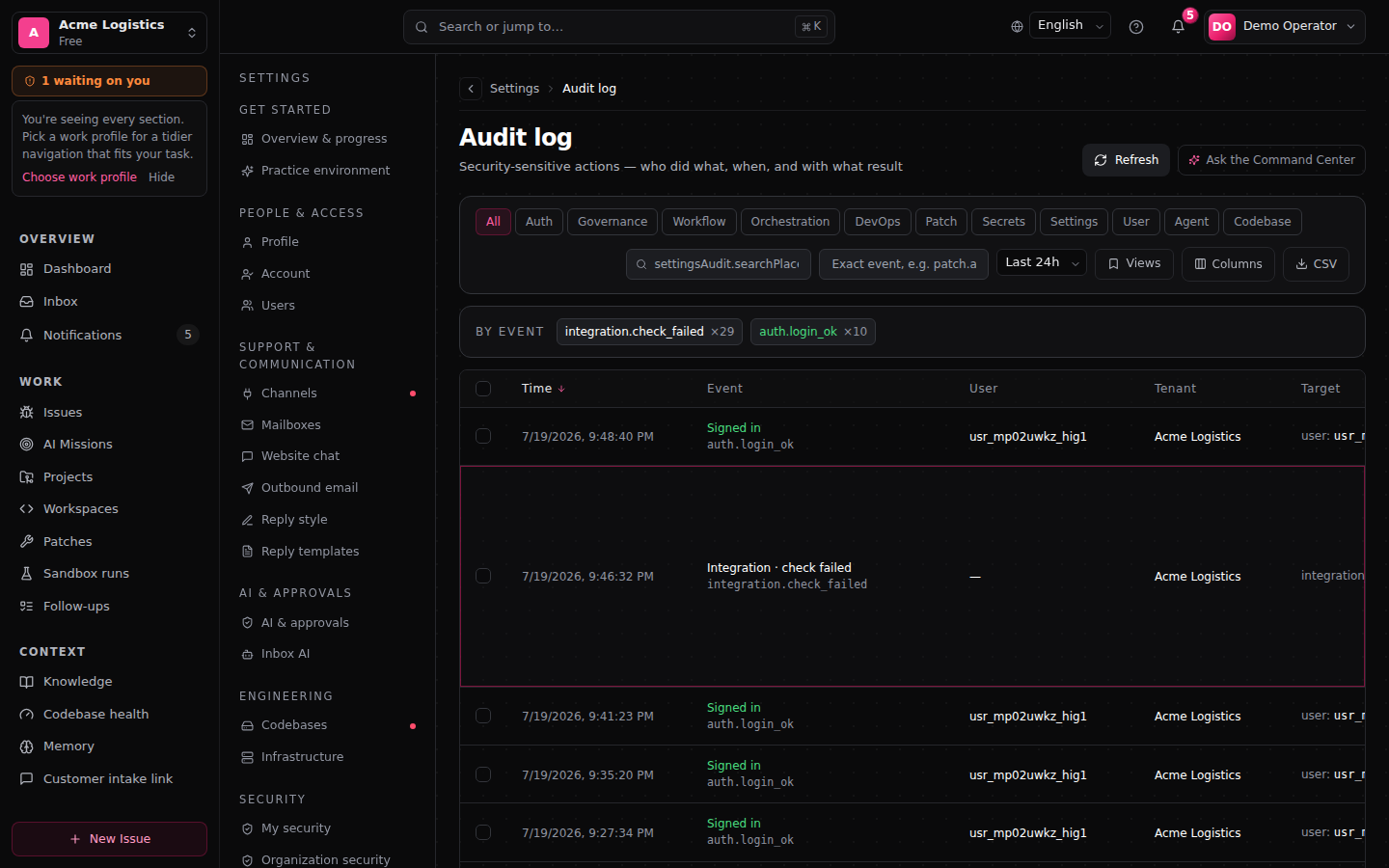
Export
Admins and Managers can export the audit rows for their organization from Settings → Audit → Export, on the Pro and Enterprise plans. On other plans the export is refused with a clear reason, and the refusal is recorded.
The export is a CSV in a signed envelope. Each row carries its chain_seq, prev_hash and entry_hash. The envelope is HMAC-signed with a key that FixControl holds, so the signature proves the file was not altered after export. It is not independent, third-party verification of the chain.
Retention
The audit chain's retention window is platform-wide: 365 days on the hosted service, with a floor of 90 days. FixControl sets it, not your organization. Pruning removes only the oldest contiguous part of the global sequence and records an anchor, so the rows that remain still verify; each pruning pass is itself audited.
The audit-retention field you see for your organization is therefore advisory: it is stored and changes to it are audited, but it prunes nothing. Cutting one organization's rows out of the middle of a global chain would break verification for everyone.
The windows your organization does enforce, set by an Admin in the governance console under Audit & Retention:
| Data | Minimum when set | What happens when the window passes |
|---|---|---|
| Agent traces | 7 days | Deleted. |
| Approval free text and evidence | 90 days | Redacted; the decision itself is kept. |
| Runtime logs | 7 days | Deleted. |
| Customer communication content | 30 days | Redacted; the delivery record stays. |
All four default to 0, which means "keep". A value between 1 and the minimum is refused. See Governance.
The event timeline in the inbox detail view is a separate activity stream for operators, not part of the security audit log.
Erasure requests
When a person asks to have their personal data erased, FixControl pseudonymizes and redacts rather than deletes. This is not self-service: you submit the request, and FixControl platform staff carry it out with a 2FA session, approval from a second platform admin, a recorded reason, and the subject's e-mail address typed as confirmation. It cannot be undone.
- The user's e-mail address and display name are overwritten, the account is deactivated and their sessions are revoked. The user record keeps its id, so a past approval still resolves — to an "erased user" placeholder instead of a name.
- Content that named the person as reporter or sender is pseudonymized in place.
- Audit rows that mentioned the person are redacted: the content is replaced by a marker with the reason and a hash of what was removed, while the row's chain position and hash stay, so the chain keeps verifying.
- One limitation: rows written before a change in how row hashes are computed include the content directly in their hash, so they cannot be redacted without breaking the chain. Those rows are counted and reported back with the erasure result, and they leave the system when the audit retention window passes.
What erasure does not reach. Erasure works on identifiers, not on free text. Three kinds of content have their own route:
- Approval text (description and decision note) — cleared by the approval retention window, which keeps the decision.
- Customer communication bodies — redacted by the communication retention window, which keeps the delivery record.
- Knowledge base content — the automatic writer strips e-mail- and phone-shaped identifiers before storing; text typed into a knowledge document by hand is not re-scanned. Delete the source document to remove it.
Sessions
- Duration: 24 hours from sign-in, fixed. There is no idle timeout.
- Cookie: the session is an httpOnly cookie, not readable by page scripts.
- Sign out on this device: top right.
- Revoke sessions: an Admin goes to Settings → Security → Organization security, card Revoke sessions, and chooses One user (by user id) or All members of one workspace (your own). A revoked user simply signs in again. A revocation takes effect across all FixControl servers within seconds.
- Automatic revocation: changing a user's role, deactivating or deleting them ends their sessions, so the change applies immediately instead of at expiry.
The keys that sign sessions are rotated by FixControl as an explicit, audited operation, not on a fixed schedule. Platform-wide revocation is also FixControl's.
Sessions and workspaces
A session is scoped to one workspace at a time; users with access to several workspaces switch between them (Switching workspaces).
- Switching keeps the original expiry. A switch is not a new sign-in and cannot extend the session.
- Revocations keep applying. Every switch is checked against revocations using the original sign-in time; a revoked session cannot switch its way back in.
- Revoking a user signs them out of every workspace. Revocation acts on the account, not on the workspace you happen to be in.
- Platform staff can enter an active workspace without a membership to support you. They act there with the Admin role, and the entry is audited. A blocked workspace cannot be entered this way.
The workspace of a session is decided on the server; it is not taken from a header, a URL parameter or a browser setting.
Passwords and two-factor authentication
- Passwords: at least 8 characters.
- Two-factor authentication (2FA): built-in TOTP with an authenticator app, plus 10 single-use recovery codes. Each user sets it up for themselves under Settings → Security → My security.
Workspace two-factor policy
Under Settings → Security → Organization security, the card Workspace two-factor policy has the toggle Require 2FA for all members.
- Only Admins can change it, and they must have 2FA on their own account first. Every change is audited.
- When it is on, members without 2FA are taken to setup at their next sign-in and cannot use the app until it is enabled. This includes your Admins.
- When it is off, your Admins are not forced to use 2FA. FixControl platform staff always need 2FA, regardless of this setting.
- Users who sign in through your identity provider (OIDC) get their MFA from that provider instead of FixControl's 2FA.
Actions that require a 2FA session
Managing users, changing settings, agents, codebases, integrations and intake, rolling back an applied patch, changing retention, waiving a verification verdict and purging governance data require a session confirmed with 2FA — whenever the user has 2FA enrolled or the workspace policy requires it.
Lost authenticator
FixControl platform staff reset the enrollment on request; the user then sets up 2FA again. Recovery codes let a user sign in without contacting anyone.
Identity: SSO and SCIM
| Method | When to use | Who sets it up |
|---|---|---|
| Password + 2FA | Organizations without an enterprise identity provider. | Your Admin, under Settings → Users. |
| OIDC single sign-on | Organizations with an identity provider; MFA comes from the provider. | FixControl platform staff, on request. |
| SCIM 2.0 | Automatic user provisioning and deprovisioning from your identity provider. | FixControl platform staff issue the token; you configure your provider. |
SAML is on the roadmap, not available today. See Users & identity for details.
Two-person rule for irreversible platform operations
Five operations need two FixControl platform admins — one to approve, another to carry it out with a single-use, short-lived approval: wiping a workspace's data, deleting a user across the platform, rotating the master encryption key, dropping an audit partition and GDPR subject erasure. None of them can be undone. Each step, refusal and rate-limit hit is audited.
These are FixControl's operations, not something your organization admin runs. Scheduling a workspace for deletion is deliberately not on this list, because it can be reversed for 14 days — see Workspace deletion.
During an incident
If you suspect a leaked password or unusual activity:
- Revoke sessions for the account (Settings → Security → Organization security).
- Reset the password or deactivate the user (Settings → Users).
- Review the audit log for that account's activity in the affected period.
- Contact FixControl via /contact. Platform staff can look at platform logs and check the chain on your behalf.
Private infrastructure connectivity
Private Kubernetes clusters, Argo, Jenkins and GitLab connect through the FC Agent: a service in your own environment that connects outbound to FixControl over HTTPS and executes signed, expiring, single-use operations. FixControl needs no inbound access to your network for those connections. See FC Agent — private infrastructure.
Workspace deletion
Deleting a whole workspace is a scheduled platform operation, not a button in your settings. Ask FixControl; a platform admin schedules it after typing the exact workspace name.
- Access is frozen immediately. The workspace stays visible in the switcher, greyed out, with the reason.
- The data stays intact for a 14-day restore window, during which a platform admin can restore it.
- After the window, the purge runs automatically and cannot be reversed.
- Scheduling, restoring and purging are each audited. Export your audit history before the purge if you need it.
Deleted items and restore
Deleting an issue, a work session, a project or a codebase is a soft delete: it disappears from active work, the deletion is audited, and its approval decisions, verification verdicts and audit history are kept. An Admin can restore it through the API; there is no restore button in the screens yet.
What is intentionally not supported
- Auto-merge of patches. A patch is delivered as a pull request or commit; merging is your decision.
- Customer-managed encryption keys (BYOK).
- Self-service workspace deletion. See Workspace deletion.
- Self-service SSO, SCIM, second-workspace access or project authorization. These are switched on by FixControl platform staff on request.
- Mapping SCIM groups to FixControl roles. Groups are stored; roles are set per user.
- SAML. On the roadmap.
FAQ
Will my customers see that I use FixControl? Replies go out from your own support address, without a "Powered by" badge.
Do you store e-mails in your database? Yes, the fields needed for inbox tracking (sender, subject, body). Deleting the issue is a soft delete; see Deleted items and restore. Communication content can be redacted after a window you set.
Which FixControl staff can access my data? Platform staff can enter your workspace for support and read across tenants under an audited platform-admin context. Those entries are recorded as audit events.
Can someone at FixControl change the audit log unnoticed? The database refuses edits to the audit tables outside an audited maintenance path, and any change to a row would break every later hash, which the hourly verification reports. A signed export proves the file was not altered after export.
Is FixControl SOC 2 or ISO 27001 certified? Not yet. FixControl does not hold these certifications today.
Can I get a static IP for outbound webhooks? Not currently. Outbound webhooks carry an HMAC signature (X-FixControl-Signature), so receivers can verify them cryptographically instead of by source IP.